
Enterprise applications often support different departments while contributing to the same business processes. A CRM manages customers and sales opportunities, an ERP handles orders and financial transactions, and other applications support inventory, logistics, or reporting. When these systems operate independently, employees may need to re-enter information, reconcile inconsistent records, and manually track transactions across departments.
Enterprise application integration (EAI) connects these systems so information and workflows can move across applications more consistently. However, connecting APIs is only part of the challenge. Organizations must also determine how data is governed, how integrations respond to failures, and how connected systems remain reliable as requirements evolve.
This guide explores architecture choices, integration reliability, and practical challenges when connecting ERP, CRM, and legacy applications, including considerations for enterprises operating.
What Is Enterprise Application Integration?
Enterprise application integration enables business applications to exchange information and coordinate workflows across systems and departments. Rather than treating applications as isolated environments, EAI establishes connections that support processes spanning multiple platforms.
While data integration focuses primarily on transferring, transforming, or consolidating information, EAI also addresses how applications interact to execute business activities.
Several technologies support enterprise system integration. Application programming interfaces (APIs) expose data and functionality through defined interfaces, while middleware manages communication, data transformation, and workflow orchestration. Event-driven messaging allows systems to exchange updates asynchronously when business events occur.
Organizations may also use Integration Platform as a Service (iPaaS) to connect applications. However, iPaaS is one implementation option rather than a synonym for EAI.
Ultimately, integration effectiveness depends less on the number of connected systems than on how reliably those connections support business operations.
Why ERP and CRM Integration Matters
ERP and CRM platforms manage related information from different operational perspectives. CRM systems focus on customers and sales activities, while ERP platforms handle orders, inventory, invoicing, and financial records.
Although their responsibilities differ, many business workflows depend on information flowing between them. Without reliable integration, inconsistencies can lead to duplicated records, delayed transactions, and limited visibility across departments.
Consider an illustrative B2B sales-to-fulfillment workflow. When a salesperson marks an opportunity as won in the CRM, the relevant information must be validated before reaching the ERP. The ERP then processes the order and related inventory or invoicing requirements, while order status updates become available to the sales team.
Complications arise when the CRM contains a recently updated billing address while the ERP retains an older version. Synchronizing these records without clear ownership rules could overwrite valid information or produce an incorrect invoice.
Effective ERP–CRM integration addresses such challenges through consistent data exchange, defined responsibilities, and coordinated workflows between sales, finance, and operations.
Choosing the Right Enterprise Application Integration Architecture
Selecting an enterprise application integration architecture requires balancing connectivity, scalability, maintenance, and operational complexity. The appropriate approach depends on the systems involved, how frequently information changes, and the importance of each interaction to business operations.
Point-to-Point Integration
Point-to-point integration establishes a direct connection between two applications through APIs or supported interfaces. It can work well for a small number of systems with stable requirements.
However, as applications multiply, these connections become more difficult to maintain. Changes to one system may affect several interfaces, creating tightly coupled dependencies and increasing testing requirements.
API-Led Integration
API-led integration provides reusable interfaces for accessing application data and business capabilities, such as customer records, inventory availability, or order status.
Instead of building a separate connection for every use case, organizations can expose common services to multiple applications. This approach supports reuse but requires governance over authentication, authorization, versioning, and interface changes.
Middleware and iPaaS
When applications use different data structures, protocols, or deployment environments, middleware and iPaaS platforms provide capabilities for connecting them.
These platforms can transform records, route messages, and coordinate workflows across enterprise applications. However, their benefits must be evaluated alongside licensing costs, connector limitations, vendor dependencies, and ongoing maintenance responsibilities.
Event-Driven Integration
Event-driven integration allows applications to respond asynchronously to business changes, such as an order being created or inventory levels changing.
Publishing and consuming events can reduce direct dependencies between systems, making this approach useful for distributed workflows. However, asynchronous processing also introduces requirements for handling duplicate events, message ordering, retries, and eventual consistency.
How to Choose the Right Integration Architecture
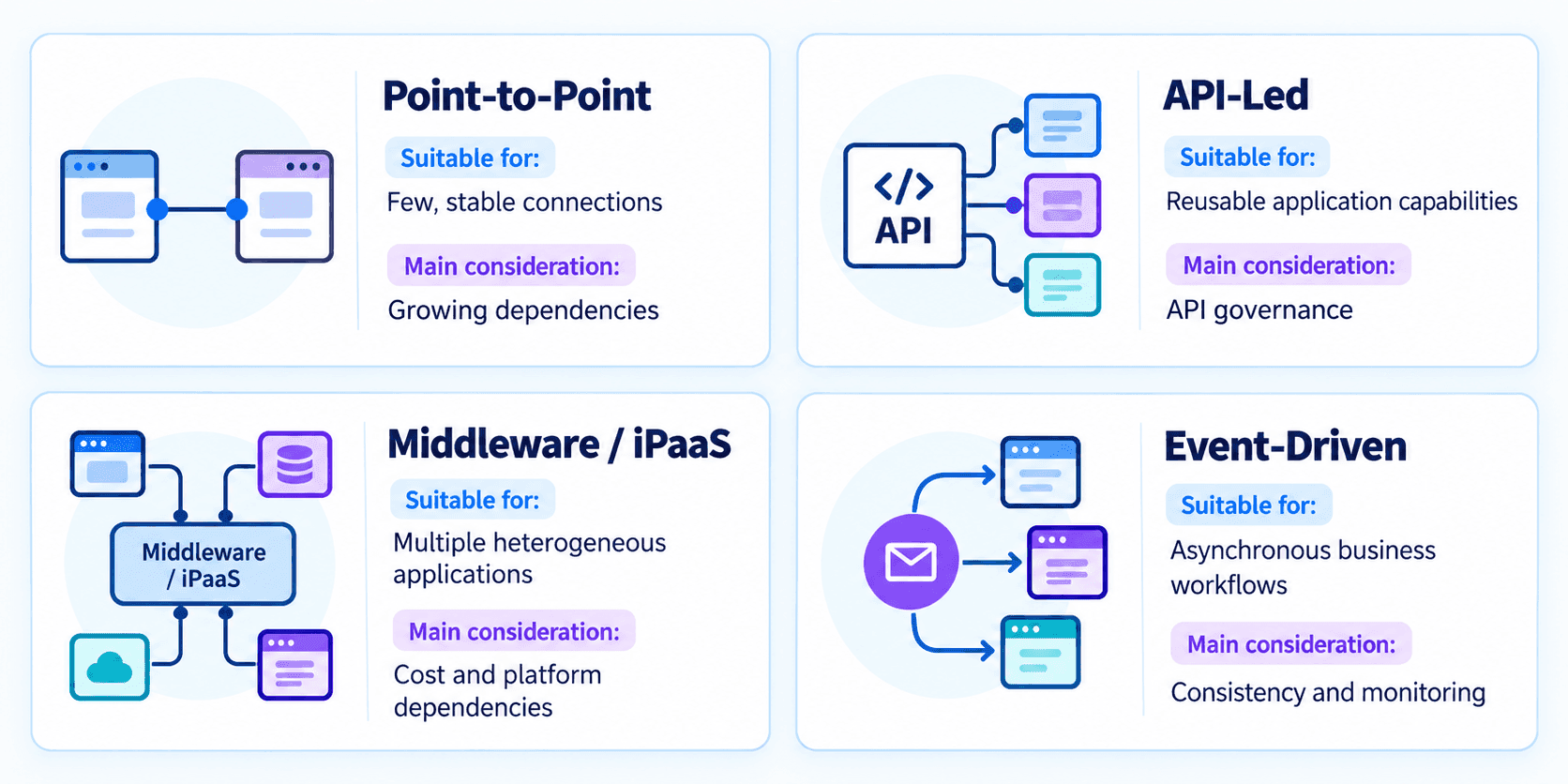
These approaches are not mutually exclusive. A hybrid integration architecture, for example, may combine APIs, middleware, and messaging to connect an on-premises ERP with a cloud-based CRM.
The final decision should reflect business requirements, existing infrastructure, transaction criticality, and internal operational capabilities.
Designing Enterprise Application Integration for Reliability and Scale
Choosing an architecture establishes how applications communicate, but reliable operations also depend on data ownership, failure handling, and visibility across connected workflows.
Align Integration Design With Business Workflows
Integration design should begin with the processes applications must support rather than the technologies available.
Organizations need to identify critical workflows, map application dependencies, and determine where information originates and becomes authoritative. A structured approach to software project scoping helps clarify these requirements before implementation.
Data ownership is particularly important when ERP and CRM platforms maintain overlapping records.
Returning to the billing-address scenario, the CRM might manage customer contact information while the ERP controls approved invoicing details. Integration rules must determine whether updates can flow automatically between systems or require additional validation.
Without these decisions, synchronization may introduce new inconsistencies rather than resolve existing ones.
Organizations should therefore establish field mappings, ownership rules, acceptable synchronization delays, and reconciliation procedures. For enterprises operating across the UAE and Saudi Arabia, additional requirements may include Arabic and English data fields, multiple currencies, tax identifiers, and invoice-related information.
By aligning integration design with business responsibilities, organizations can reduce the risk of disrupting established workflows.
Engineer APIs and Data Flows for Reliability
Even when applications communicate correctly under normal conditions, unexpected traffic or temporary outages can expose integration weaknesses.
API contracts should define requests, responses, authentication, authorization, and error behavior. Reliable operations also require accounting for differences in system processing capacity.
Consider a CRM generating numerous order events while the ERP can process only a limited number of requests. Forwarding every event immediately may overwhelm the ERP and increase transaction failures.
An integration layer can manage this situation through message queues and controlled processing. Throttling and backpressure protect downstream systems, while retry policies address temporary communication failures.
Retries, however, introduce another challenge. A request may succeed even when its response is lost. Repeating it without safeguards could create duplicate orders, invoices, or inventory transactions.
Idempotency mechanisms reduce this risk by preventing repeated requests from producing unintended duplicate results. In message-based systems, this may involve recording processed message identifiers and coordinating transaction handling across services.
These controls should work alongside monitoring, reconciliation, and recovery procedures. Successfully queuing a message does not necessarily mean the underlying business transaction has been completed.
For legacy or hybrid environments, custom middleware and adapters may also be necessary to translate proprietary formats or accommodate older interfaces.
Reliable integration therefore requires designing for failures and recovery, not only successful communication.
Validate, Monitor, and Evolve Integrations
Integration testing should verify both application compatibility and the behavior of connected workflows when something goes wrong.
Contract testing helps identify interface incompatibilities, while integration tests can reveal problems involving invalid records, delayed responses, duplicate events, and partial transaction failures.
For example, a CRM may successfully publish an order event while the ERP fails to complete processing. Without monitoring, the sales team could assume that the order exists even though the transaction remains incomplete.
Centralized logging and correlation identifiers help technical teams trace transactions across systems. Distributed tracing may provide additional visibility in more complex architectures.
Monitoring should focus on failed synchronizations, processing delays, queue backlogs, and unresolved exceptions. Organizations also need documented procedures for recovering and reconciling incomplete transactions.
Deploying integrations incrementally can limit disruption. Beginning with a critical workflow allows teams to validate production behavior before expanding connectivity.
As applications evolve, integration contracts, security controls, and monitoring requirements should be reviewed to maintain compatibility and reliability.
Common Enterprise Integration Challenges and Solutions
Even well-designed integrations can encounter difficulties involving data consistency, legacy technology, security, and operational dependencies. Addressing these constraints requires more than technical connectivity.
One challenge arises from differences in how applications structure information. CRM systems organize data around accounts, contacts, and opportunities, while ERP platforms maintain customer master records, orders, and financial transactions. Different identifiers and validation rules can cause synchronization errors. Clear ownership, field mappings, and reconciliation procedures help prevent discrepancies from affecting downstream processes.
These challenges become more complicated when older applications operate alongside modern cloud platforms. Legacy systems may expose limited APIs, use proprietary interfaces, or lack support for modern authentication methods. Middleware and adapters can bridge some differences without requiring immediate replacement. However, broader architectural limitations may require organizations to evaluate their legacy system modernization options.
Beyond compatibility, security and regulatory requirements introduce additional complexity. Enterprise integrations may process personal, financial, and commercially sensitive information, making access controls, encryption, auditability, and appropriate data-transfer safeguards important design considerations.
In Saudi Arabia, applicable Personal Data Protection Law requirements may influence personal data processing or cross-border transfers. ZATCA's Phase Two e-invoicing framework also requires affected taxpayers to integrate compliant invoicing solutions with the Fatoora platform according to their designated implementation wave.
Similarly, the UAE's e-Invoicing programme introduces structured invoice exchange and reporting requirements through an accredited service-provider framework. These developments can affect ERP data mapping and invoice-processing workflows. Because obligations vary by jurisdiction and business activity, enterprises should verify applicable requirements before finalizing integration designs.
Operational dependencies also deserve attention. Third-party API changes, connector outages, and unsupported upgrades can interrupt workflows even when internal applications remain available. Clear ownership, compatibility testing, dependency monitoring, and recovery procedures help reduce these risks.
When Does Enterprise Integration Require Custom Software Development?
When applications provide compatible native connectors and workflows follow standardized processes, existing integrations or iPaaS platforms may offer an effective approach with less implementation effort.
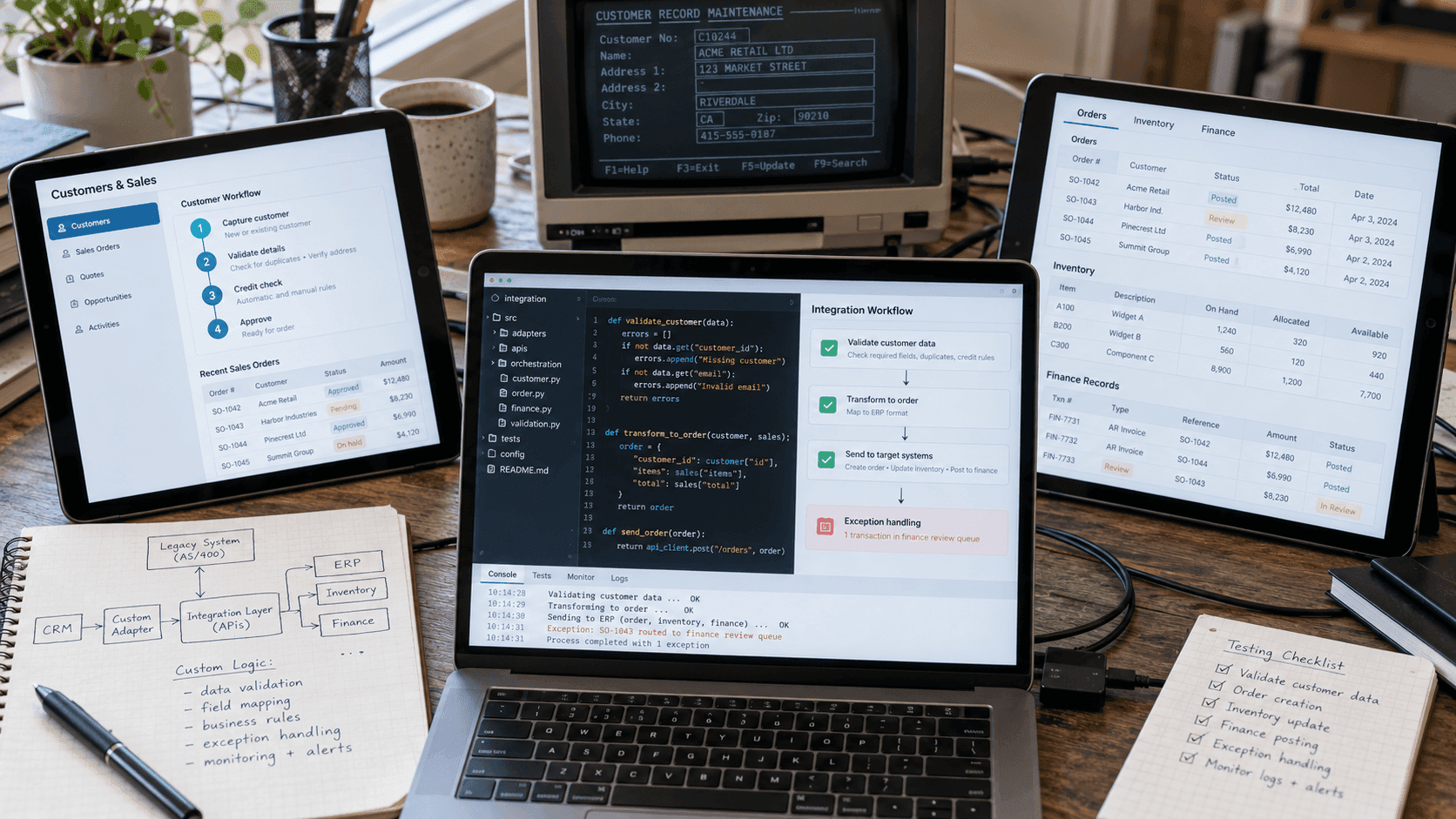
However, these solutions can become restrictive when organizations rely on customized ERP modules, proprietary legacy interfaces, or business rules spanning multiple applications.
In such cases, custom software integration can provide flexibility through tailored APIs, middleware, adapters, or orchestration services.
For example, a custom component might validate CRM customer information against ERP requirements, transform approved transactions into order records, and route exceptions to the finance team. This allows integration behavior to reflect specific operational requirements instead of being constrained by standard connectors.
The decision should still account for implementation complexity, security, maintainability, and total cost of ownership. Custom components introduce responsibilities involving testing, documentation, monitoring, and future updates.
Rather than replacing existing applications by default, organizations should evaluate whether standard integration capabilities are sufficient or tailored software is needed to address remaining gaps.
Building a More Connected and Reliable Enterprise
Enterprise application integration is not simply about enabling systems to exchange data. Its long-term value lies in how effectively connected applications support business processes, maintain data consistency, and adapt to changing operational requirements.
Achieving this requires a clear understanding of existing systems, thoughtful architectural decisions, and an approach to integration that balances reliability with flexibility. As enterprise environments become more complex, organizations may also need to look beyond standard integration tools to address workflows and technical constraints specific to their operations.
This is where tailored software solutions can play a supporting role, helping bridge gaps between existing applications without necessarily replacing the systems businesses already depend on.
For organizations exploring this approach, Titani's Custom Software Development Services offer a starting point for understanding how tailored applications and integration capabilities can support evolving business needs.