
Many enterprise QA teams already have test automation in place. They may use Selenium, Cypress, Playwright, Appium, or other frameworks to run regression tests and support faster releases. Yet the real challenge is no longer whether testing can be automated. It is whether that automation can stay reliable as products, interfaces, integrations, and business rules change.
According to the World Quality Report 2025-26, 43% of organizations are experimenting with Gen AI in QA, but only 15% have scaled it enterprise-wide. This gap shows why teams need more than AI-enabled tools. They need governance, workflows, and metrics that make AI testing safe to use at scale.
AI automated testing helps QA teams move beyond brittle scripts by supporting test creation, maintenance, prioritization, and failure analysis. It can reduce repetitive maintenance work, detect unstable tests, and help QA engineers focus more on release risk, edge cases, and business-critical workflows. For UAE and KSA enterprises, speed alone is not enough. Testing must also be secure, auditable, and controlled.
1. What Is AI Automated Testing?
AI automated testing is the use of artificial intelligence to improve how software tests are created, executed, maintained, prioritized, and analyzed. Instead of relying only on fixed scripts written and updated manually, AI can help QA teams identify patterns, detect unstable tests, suggest test cases, analyze failed runs, and decide which tests should be prioritized before a release.
Traditional test automation is still valuable. It automates repetitive execution, but scripts often require continuous maintenance when the product changes. A small update to the user interface, workflow logic, or data structure can cause tests to fail, even when the application itself is working correctly. AI automated testing helps reduce this burden by supporting test case generation, regression test prioritization, failure analysis, flaky test detection, visual regression checks, and tool-assisted self-healing when minor UI changes break scripts.
The goal is not to replace QA engineers. The goal is to help QA teams spend less time fixing repetitive automation issues and more time reviewing business logic, release risks, user experience, and edge cases that still require human judgment.
Concept | Meaning |
Traditional test automation | QA teams create and maintain scripts manually to automate repetitive testing tasks. |
AI automated testing | AI supports test creation, maintenance, prioritization, execution analysis, and failure detection. |
AI software testing | QA teams test AI-powered systems, models, outputs, prompts, risks, accuracy, bias, safety, and reliability. |
For example, using AI to prioritize regression tests before a release is AI automated testing. Testing whether an AI chatbot gives accurate, safe, and compliant answers is AI software testing. For teams building or validating AI-powered systems, Titani’s AI software testing checklist explains how to assess accuracy, safety, security, compliance, reliability, and launch readiness before deployment.
2. Why AI Automated Testing Matters for UAE and KSA Enterprises
For enterprises in the UAE and KSA, software quality is directly connected to business continuity, customer trust, and operational efficiency. Many organizations are investing in digital platforms, AI-powered workflows, mobile apps, customer portals, cloud systems, and internal automation tools. These systems often support critical processes such as payments, logistics tracking, patient services, government workflows, e-commerce operations, and enterprise reporting.
As systems become more complex, traditional QA approaches can struggle to keep pace. Manual testing takes time. Script-based automation helps, but it can become expensive to maintain when products change frequently. AI automated testing helps by making QA workflows more adaptive. Instead of treating automation as a fixed set of scripts, AI can help teams understand which tests are most relevant, which failures need attention, and which areas carry the highest release risk.
This matters for three reasons. First, faster digital transformation requires faster testing. If testing remains slow, releases are delayed. If testing is rushed, defects may reach production. Second, business-critical systems need higher release confidence. In fintech, healthcare, logistics, e-commerce, and government-related services, defects can affect transactions, availability, and operational decisions. Third, compliance and security expectations are higher. Enterprise buyers in the UAE and KSA prioritize privacy, auditability, and operational control. The UAE Personal Data Protection Law and Saudi Arabia’s Personal Data Protection Law reinforce the need to control how test data, logs, screenshots, and reports are handled in AI-enabled workflows.
For this reason, AI automated testing should be introduced as a controlled, compliance-aware improvement to the QA process rather than a broad automation rollout from day one.
3. Where AI Automated Testing Creates the Most Value
AI automated testing is most effective when it is applied to the right testing problems. It should not be introduced simply because a tool has AI features. For enterprise QA teams, the best starting point is a workflow where the testing pain is clear, the business impact is measurable, and the implementation risk is controlled.
Regression testing
Regression testing is one of the strongest starting points. In many enterprise environments, regression suites grow over time, but not every test has the same business value before every release. AI can help prioritize regression tests based on recent code changes, affected modules, historical defects, and high-risk workflows.
Visual regression testing
Visual regression testing is useful for web applications, dashboards, admin portals, mobile apps, and customer-facing platforms. AI-assisted visual testing can compare screens, detect meaningful layout changes, and reduce noise from minor differences that do not affect users. For bilingual or localized interfaces, it can also help identify display issues across English and Arabic layouts.
CI/CD test prioritization
When testing is connected to CI/CD pipelines, QA teams need fast feedback. Running a full regression suite after every change may be too slow, while running too few tests increases release risk. AI can help decide which tests should run based on code changes, risk areas, failed build history, and business-critical workflows.
Flaky test detection and failure analysis
Flaky tests reduce trust in automation. As the Google Testing Blog explains, flaky tests can produce both passing and failing results for the same code. A 2025 study on systemic flakiness also describes flaky tests as inconsistent outcomes that create major challenges for software developers. For enterprise QA teams, this makes failure analysis important because teams need to understand whether a failed run points to a real defect, an unstable test, an environment issue, or a data problem. In an AI automated testing framework, AI-assisted failure analysis can support this process, but human review should still confirm the final cause.
More advanced use cases, such as self-healing test maintenance, test data generation, API optimization, defect prediction, and post-release monitoring, can create value once the core QA workflow is stable. For teams comparing platforms, Titani’s guide to AI testing tools explains how different tools support test generation, visual testing, continuous testing, and defect prediction.
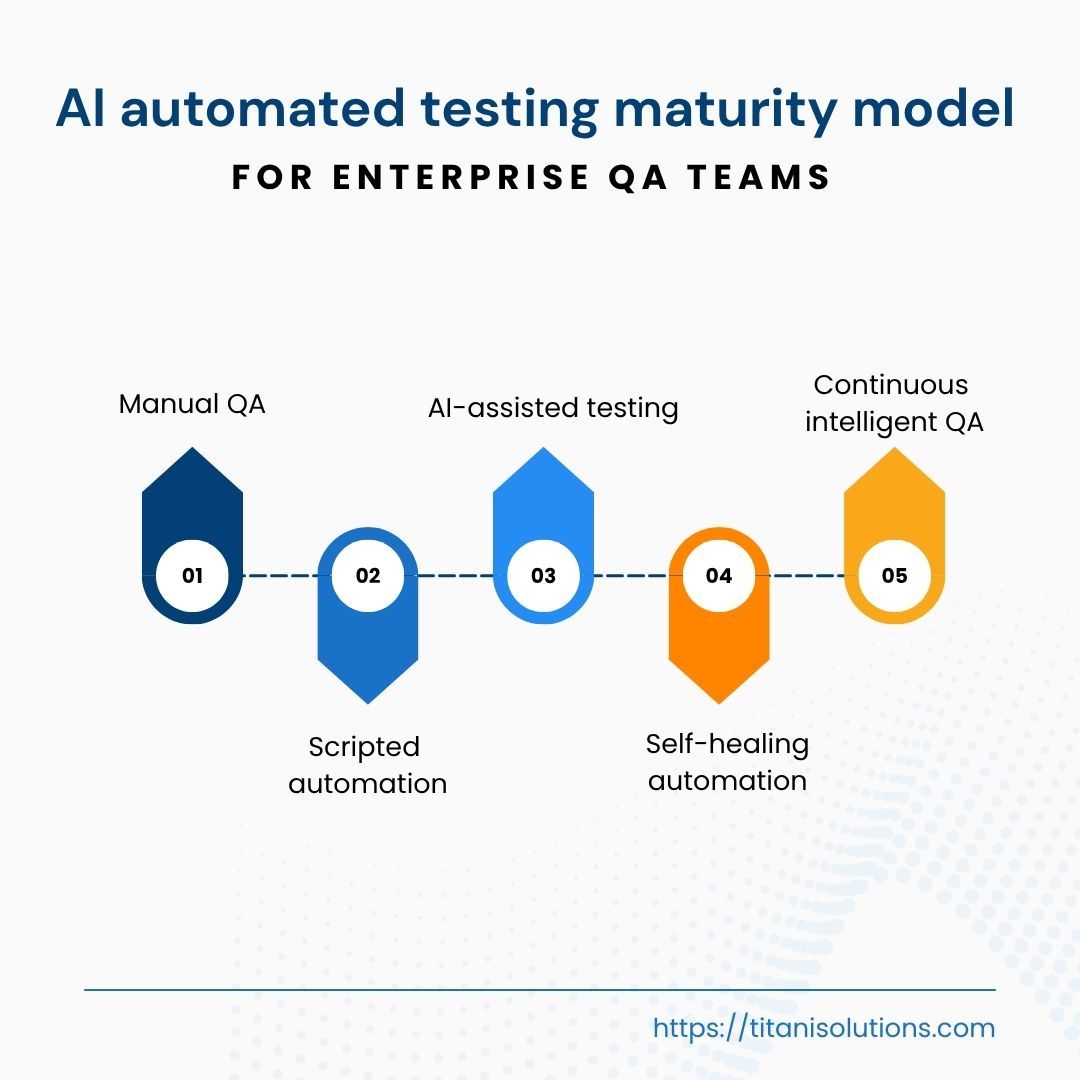
4. AI Automated Testing Maturity Model
Before adopting AI automated testing, enterprises should understand where their QA process stands today. A team with mostly manual testing has different needs from a team that already runs automated regression suites in CI/CD but struggles with flaky tests and script maintenance.
Level | QA maturity | Typical signal | Practical next step |
Level 1 | Manual QA | Testing depends heavily on human testers and manual checklists. | Standardize test cases and identify repetitive workflows for automation. |
Level 2 | Scripted automation | Automation exists, but scripts require frequent maintenance. | Improve test stability and identify where AI can reduce maintenance effort. |
Level 3 | AI-assisted testing | AI supports test generation, failure analysis, log review, or test prioritization. | Connect AI-assisted testing to release workflows and define review gates. |
Level 4 | Self-healing automation | Tests can adapt to minor UI, selector, or workflow changes. | Expand with audit trails, reporting, and human oversight. |
Level 5 | Continuous intelligent QA | AI is integrated into CI/CD, monitoring, risk scoring, and release decision support. | Use AI quality signals to support scalable, governed QA. |
Most enterprises do not need to jump directly to Level 5. In many cases, the best move is from Level 2 to Level 3, where AI begins supporting the existing QA process without replacing the full automation stack. A team that already uses scripted automation may start with failure analysis, flaky test detection, or regression prioritization before exploring self-healing automation.
The maturity model also prevents unrealistic expectations. Self-healing automation may sound attractive, but at enterprise level it requires clear rules around what the system can adjust automatically, what needs human review, and how changes are documented. The goal is not to reach the highest maturity level as fast as possible. The goal is to move one step forward with control.
5. How to Build an AI Automated Testing Framework
AI automated testing works best when it is introduced as a structured framework, not as a one-time tool purchase. A better first question than “Which AI testing tool should we use?” is “Which testing problem should we solve first, and how will we know if AI improves it?”
Step 1: Choose one controlled use case
The first use case should be narrow enough to control, but important enough to measure. A good candidate runs frequently before releases, creates repeated QA effort, has clear pass or fail expectations, and has a history of flaky tests, broken scripts, or slow regression cycles. A customer portal login flow, shipment status update, invoice screen, or admin dashboard may be a better starting point than a full payment system or complex compliance workflow.
Step 2: Define baseline KPIs
AI automated testing should be measured against clear baseline metrics. Common metrics include regression cycle time, test maintenance effort, flaky test rate, false positive rate, time to diagnose failed tests, escaped defects, and QA effort per sprint. The goal is not to show that AI can run more tests. The goal is to show that AI improves release confidence, test stability, and QA efficiency.
Step 3: Select tools that fit your current stack
A tool should fit the current QA environment. Teams should check whether it integrates with frameworks such as Selenium, Cypress, Playwright, Appium, Jira, GitHub, GitLab, Jenkins, or Azure DevOps. They should also check whether QA engineers can understand and review AI-generated output, whether the tool provides logs and audit history, and how it handles test data.
Step 4: Set review gates and ownership
AI automated testing should not become a black box inside the release pipeline. Review gates may be needed when AI generates new test cases, a test is automatically updated, a high-risk workflow fails, or the system flags possible false positives or false negatives. QA may review AI-generated tests, DevOps may monitor pipeline behavior, security may review data exposure risks, and product owners may approve business-critical release decisions.
Step 5: Protect test data before CI/CD integration
AI automated testing may involve logs, screenshots, user flows, application states, test data, and failure reports. Before connecting AI-enabled testing into CI/CD workflows, teams should define controls such as masking sensitive data, using synthetic test data where possible, limiting access to logs, avoiding uncontrolled use of production data, reviewing vendor data policies, and controlling what information is sent to AI-enabled tools.
Once these controls are clear, teams can connect AI automated testing to CI/CD gradually. The safest approach is to start with support functions such as failure analysis, flaky test detection, or regression prioritization before allowing AI-driven signals to influence release gates.
6. Governance, Security, and Human Oversight
AI automated testing can help QA teams move faster, but speed should never come at the cost of control. For enterprise systems, testing results must be explainable, reviewable, and safe to use in release decisions. This governance-first approach aligns with the NIST AI Risk Management Framework, which focuses on helping organizations manage risks to individuals, organizations, and society when adopting AI systems.
Governance should cover four areas. First, AI-generated tests still need human review. QA teams should check whether a generated test matches the real business requirement, covers the right user flow, handles edge cases, and produces meaningful pass or fail results.
Second, false positives and false negatives must be managed. A false positive reports a failure even though the application works correctly. This wastes QA time and reduces trust in automation. A false negative is more dangerous because it creates false confidence while a real issue still exists.
Third, audit trails and reporting are essential. Enterprise QA teams need evidence showing which tests were executed, which tests were generated or prioritized by AI, who reviewed the results, which failures were accepted or escalated, and why a release was approved or delayed.
Fourth, test data governance should be clearly defined. Teams should clarify who can access logs and reports, which data can be used inside AI-enabled tools, which data must be masked or replaced with synthetic data, how long records are stored, and what evidence is required for internal review or audit. As discussed in Titani’s article on AI-powered testing and traditional QA, the stronger model is a hybrid approach where automation improves speed and human expertise protects quality, context, and trust.
7. KPIs to Measure AI Automated Testing ROI
AI automated testing should not be measured by the number of tests it can generate or execute. More tests do not always mean better quality. In enterprise QA, the real question is whether AI helps the team release faster, reduce maintenance effort, improve test reliability, and make better risk decisions.
KPI category | Metrics to track | Why it matters |
Speed | Regression cycle time, build feedback time, time to diagnose failed tests, QA effort per sprint | Shows whether AI shortens feedback loops and reduces release delays. |
Quality | Defect leakage, escaped defects, test coverage, flaky test rate, false positive rate | Shows whether AI improves release confidence and reduces production risk. |
Efficiency | Test maintenance effort, automation stability, failure investigation effort, cost per release | Shows whether QA spends less time maintaining scripts and more time reviewing risk. |
Before running a pilot, teams should create a simple baseline. For example, they can track current regression cycle time, flaky test rate, test maintenance effort, time to diagnose failed tests, false positive rate, and escaped defects. The exact targets will depend on the system, team maturity, and testing scope.
Good ROI means the team can answer three questions more confidently: Can we test faster without increasing release risk? Can we trust our test results more? Can QA engineers spend less time maintaining scripts and more time reviewing business risk?
8. Example: From Scripted Automation to AI-Assisted QA
Consider an illustrative scenario. A UAE-based logistics platform already has scripted UI automation in place. The QA team runs regression tests before each sprint release for shipment status updates, customer notifications, delivery tracking, and admin dashboard changes. Over time, frequent interface updates, new form fields, dashboard changes, and API adjustments make the automation harder to maintain. Tests fail more often, even when the application is working correctly.
Instead of applying AI automated testing across the whole platform, the team selects one workflow for a controlled pilot: shipment status updates. The pilot focuses on visual regression checks, flaky test analysis, and regression test prioritization.
Capability | Purpose |
Visual regression checks | Detect meaningful layout or display changes in the shipment tracking interface. |
Flaky test analysis | Identify whether failures are caused by real defects, unstable selectors, timing issues, environment problems, or test data inconsistencies. |
Regression test prioritization | Help QA decide which related test cases should run first when shipment workflows change. |
The lesson is that AI should first improve the reliability of one existing QA bottleneck before it becomes part of a wider testing strategy.
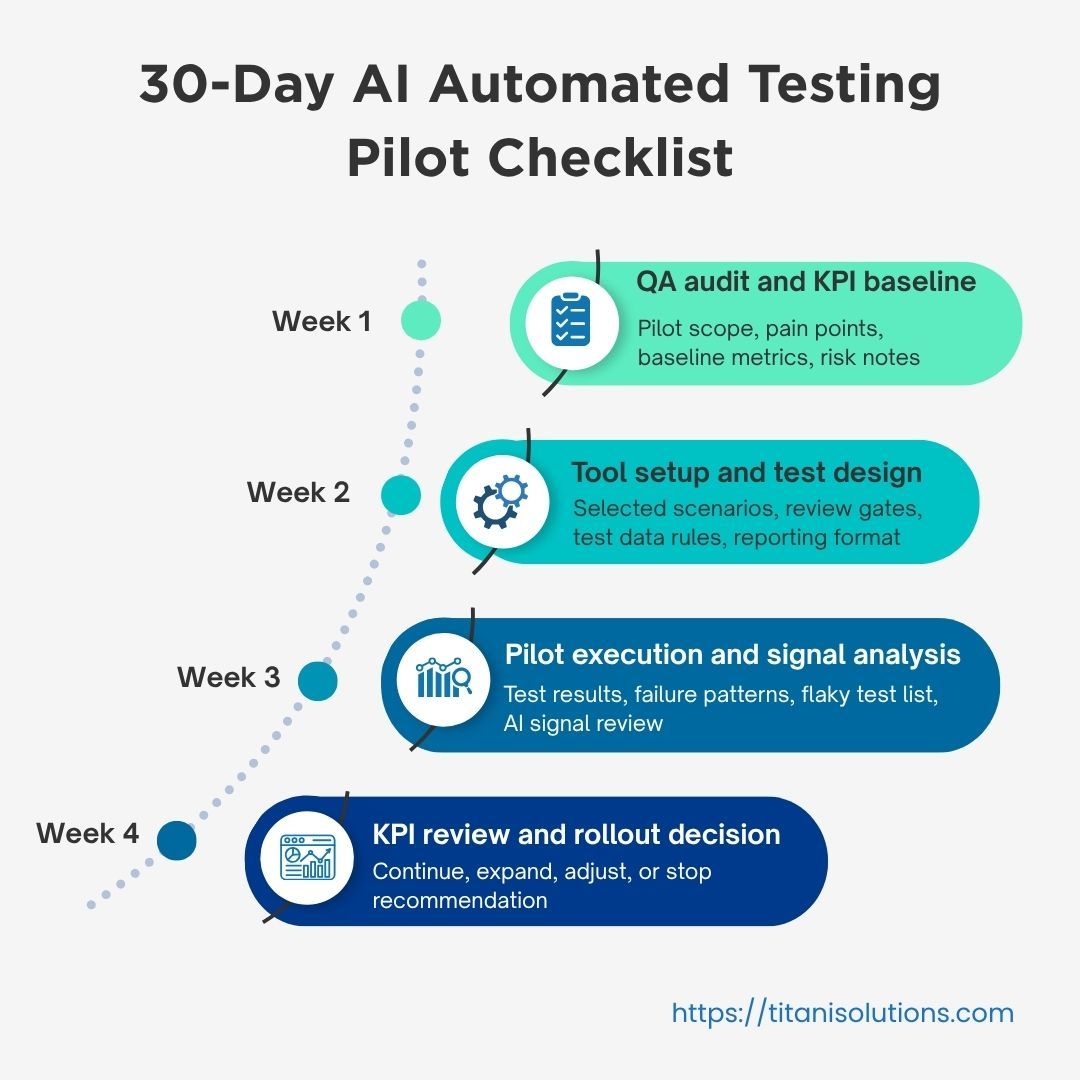
9. 30-Day AI Automated Testing Pilot Checklist
AI automated testing should begin with a controlled pilot, not a full-scale rollout. A pilot helps the team test one specific workflow, measure results, and decide whether the approach is worth expanding. For most enterprise QA teams, 30 days is enough to validate the first use case if the scope is narrow and the success metrics are clear.
Week | Focus | Key output |
Week 1 | QA audit and KPI baseline | Pilot scope, pain points, baseline metrics, risk notes |
Week 2 | Tool setup and test design | Selected scenarios, review gates, test data rules, reporting format |
Week 3 | Pilot execution and signal analysis | Test results, failure patterns, flaky test list, AI signal review |
Week 4 | KPI review and rollout decision | Continue, expand, adjust, or stop recommendation |
In Week 1, the team identifies where testing is slow, unstable, or expensive to maintain. In Week 2, the team configures the tool or workflow for the selected area only and defines how AI-generated results will be reviewed. In Week 3, the team runs the pilot and analyzes whether the results are clearer and more reliable. In Week 4, the team compares results against the baseline and decides whether to continue, expand, adjust, or stop.
Not sure which workflow should be tested first? Titani can help review your QA process and identify a low-risk, high-impact AI automated testing pilot for your enterprise systems.
10. How Titani Helps UAE and KSA Enterprises Implement AI Automated Testing
AI automated testing is not only a technology decision. It is also a QA strategy, delivery process, governance model, and risk-control framework. The challenge is not simply choosing a tool. The real challenge is knowing where AI can improve testing without creating new risks around data, compliance, release quality, or team ownership.
Titani helps UAE and KSA enterprises approach AI automated testing through a controlled, business-focused model. Titani works with teams to assess current QA maturity, identify the right first use case, define measurable KPIs, and build a pilot roadmap that fits existing development and release workflows.
QA maturity assessment
Pilot use case selection
AI automated testing setup
Regression and visual testing improvement
CI/CD integration
Governance and human review gates
Reporting and rollout recommendations
For enterprises looking to strengthen software quality, Titani’s Quality Assurance & Testing services help combine manual testing, automation, AI-assisted QA practices, and governance-focused delivery to improve release confidence across business-critical systems.
FAQ
What is AI automated testing?
AI automated testing uses AI to support test creation, prioritization, maintenance, and failure analysis. It helps QA teams improve automation reliability without replacing human review.
How is AI automated testing different from traditional test automation?
Traditional automation depends on scripts created and maintained manually. AI automated testing adds intelligence by helping teams prioritize tests, detect flaky failures, analyze results, and reduce maintenance effort.
Does AI automated testing replace QA engineers?
No. It reduces repetitive work, but human QA remains essential for business logic, edge cases, exploratory testing, compliance-sensitive scenarios, and final release decisions.
Is AI automated testing safe for enterprise test data?
It can be safe when teams use masked or synthetic data, restrict access to logs and screenshots, review vendor policies, and keep governance rules in place.
What is the best first use case for AI automated testing?
Regression testing, visual regression testing, flaky test detection, failure analysis, and CI/CD test prioritization are strong starting points. Avoid starting with the most sensitive or complex workflow.
Conclusion
AI automated testing is becoming an important part of modern QA, but enterprises should not treat it as a quick tool upgrade. The real value comes from applying AI to the right testing problems, measuring the right KPIs, and keeping governance in place.
For UAE and KSA enterprises, the priority is balanced modernization: faster releases, stronger test reliability, protected data, and clear accountability. A controlled pilot helps teams prove value before expanding AI deeper into the QA workflow.
Ready to explore AI automated testing for your enterprise systems? Talk to Titani’s QA and AI experts to identify the right pilot use case, define success metrics, and build a controlled roadmap for scalable QA automation.